Translate your Webflow store.
Own every word of it.
A Webflow app that translates your products and CMS items with DeepL and publishes each language into your own Webflow site: products as separate items, and on a site with Webflow Localization, CMS items into Webflow's own locales. You set up how visitors reach each language. What is published is your content and stays in Webflow if you uninstall.
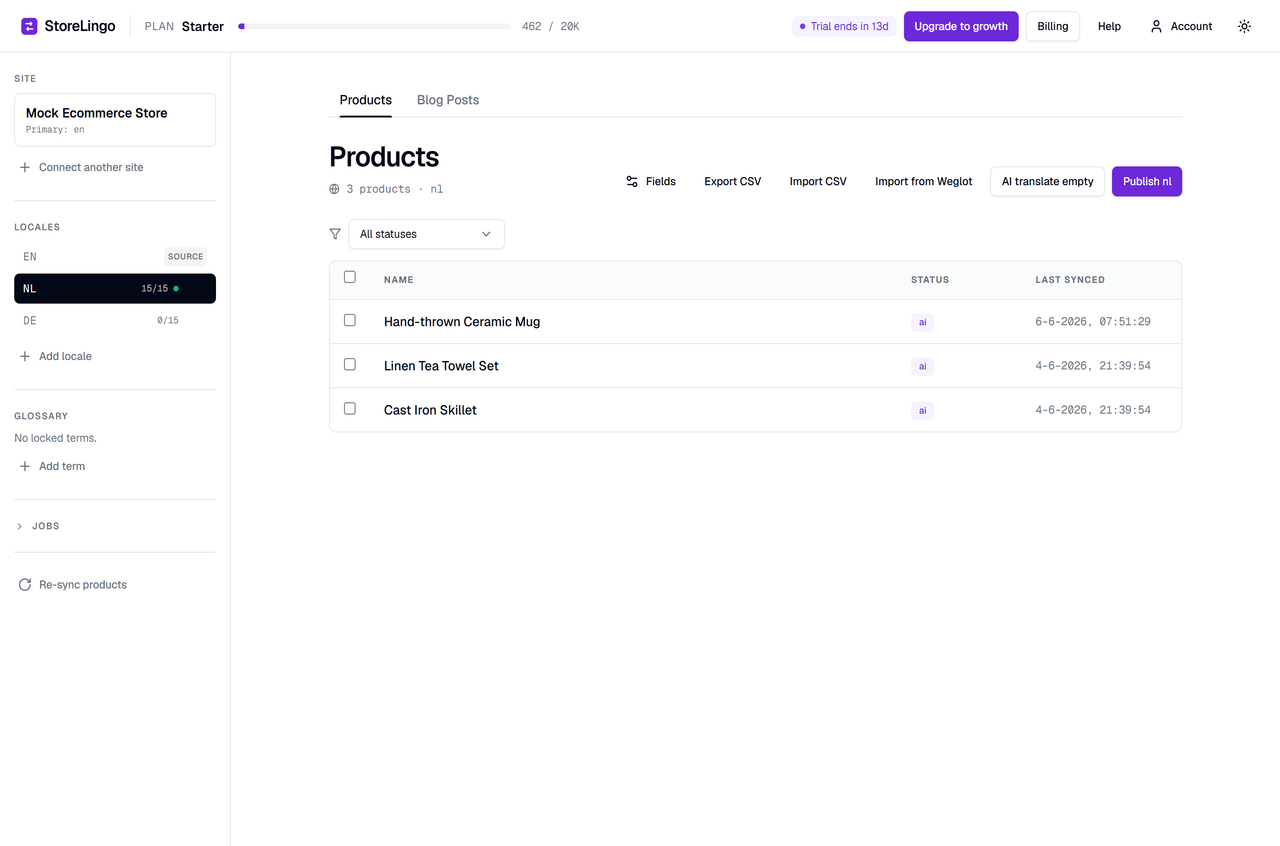
| Name | Status | Last synced |
|---|---|---|
| Hand-thrown Ceramic Mug | approved | 06-05 15:15 |
| Linen Tea Towel Set | ai | 06-04 21:39 |
| Cast Iron Skillet | edited | 06-04 21:39 |
Translating the products in a Webflow store.
According to Webflow's Help Center (Webflow Localize overview and Webflow Ecommerce overview, read on 2026-10-30), Webflow Localize does not localize Ecommerce products, categories or Ecommerce pages on sites that use Ecommerce. It does localize CMS items and static pages. StoreLingo publishes translated copies of your products and CMS items instead.
StoreLingo translates product names, descriptions and summaries, and the CMS fields you choose, with DeepL. You can edit and approve every translation before you publish.
Each language is published into your Webflow site: products as separate items, and on a site with Webflow Localization, CMS items into Webflow's own locales. It is your content, and it stays in Webflow if you cancel or uninstall StoreLingo.
Plans cost $19, $49, $99 or $249 a month, VAT included where it applies, and include a monthly AI character allowance. You do not pay per word or per visitor.
The translated copies are yours.
StoreLingo writes translated products and CMS items into your Webflow site through the Webflow Data API. They are your content and stay in Webflow if you stop using StoreLingo.
Translated products and CMS items appear in Webflow like any other item. If you edit a translated field in Webflow, StoreLingo replaces it with its own version the next time you publish that language, so make lasting edits in StoreLingo.
Webflow serves the translated pages itself. StoreLingo does not ask for permission to add custom code, places no code on your site and does not add hreflang tags.
If you reinstall StoreLingo or reconnect a site, the Lost translations dialog finds translated copies in Webflow that StoreLingo is no longer linked to. You can adopt them back without translating again, or delete them.
When the same source text was translated into the same language on the same site before, StoreLingo reuses the stored translation and it does not use AI characters. Your edits and approvals win over machine output. The glossary is a do-not-translate list for brand names and product lines.
Products: by default every text field that has text on at least one product, and image alt text; you choose which in Settings. Variant option names and values (such as "Size" and "Small") are translated and published with the product. Variant names that Webflow generates are built from the translated product name and options; variant names you typed yourself can be translated. CMS items: the same, per collection.
Connect, translate, publish.
StoreLingo opens from Webflow in its own browser tab and works on your site through the Webflow Data API.
Authorize StoreLingo on Webflow's own consent screen, pick the site you want to translate and confirm its source language.
Add a language from DeepL's list of target languages. "AI translate missing" fills the empty fields while your glossary keeps brand names untranslated. Edit any row and approve it.
Publishing writes the translated copies, with every variant, straight to your live Webflow site. StoreLingo does not publish your whole site, so your own unpublished Designer changes stay unpublished. You then set up listing pages per language, filtered by the Locale field.
What StoreLingo changes in your site, and what you do yourself
The short version. The full list is in Getting started.
- Translated copies. For each language you publish, StoreLingo creates a separate translated copy of each product that has at least one translated field, and of each CMS item. The copy takes the source's other fields as they are at publish time.
- Every variant. A translated product gets every variant of the source: the same options with translated names and values, and per variant the source's price, compare-at price, SKU code and images. Publishing again updates them, adds variants that are new in the source and removes variants deleted there (Webflow does not allow removing a product's default variant, so that one is set to stock 0). A source product you archive in Webflow gets an archived translated copy on the next publish.
- A Locale field. On the first publish StoreLingo adds a plain text field named Locale to the Products collection and to each CMS collection it publishes, and sets it on every translated copy (de, fr and so on). Your own source products and CMS items are not tagged.
-
Slugs. A translated copy's slug is the language prefix plus the source name, for example
de-blue-mug. Slugs are not translated. If a slug is taken, a suffix is added (-2 to -10, or a short one from Webflow when a deleted product's slug is still reserved). - No site publish. StoreLingo writes its copies straight to your live site and never publishes your whole Webflow site, so your own unpublished Designer changes stay unpublished.
- Item limits. Translated copies count toward your Webflow site plan's own CMS item and product limits.
- Stock sync is optional. Each translated copy is a separate product, so each of its variants has its own stock in Webflow. Stock sync is set per site and is off by default. When it is on, a stock change in one language is passed on to the others; two shoppers buying the last item in two languages at the same moment can both succeed. When it is off, StoreLingo does not read or change stock, except in one case: when you delete a variant from a source product, the next publish sets its translated copy out of stock and then deletes it, so it cannot be sold.
- Routing. Showing each language to the right visitors is your setup in Webflow: duplicate your listing pages per language and filter each Collection List by the Locale field (for the source language, the items without a Locale value). StoreLingo does not route visitors and does not switch languages. The app shows a routing guide after your first publish.
- No code to paste. StoreLingo places no code on your pages and does not add hreflang tags.
- Pages StoreLingo does not translate. Static page text, labels typed into your templates (such as "Add to cart" buttons and headings), navigation, checkout and cart pages, emails Webflow sends, Ecommerce categories and slugs.
- After you uninstall. The translated copies and their variants, the Locale field, and the Locale values on source CMS items tagged by older versions of StoreLingo stay in your site: they are your content. To remove the copies and the Locale fields StoreLingo created, run "Remove translations from Webflow" before you uninstall; afterwards StoreLingo cannot reach your site. The docs explain how to remove them by hand in Webflow. StoreLingo deletes your account and stored data 30 days after it loses access.
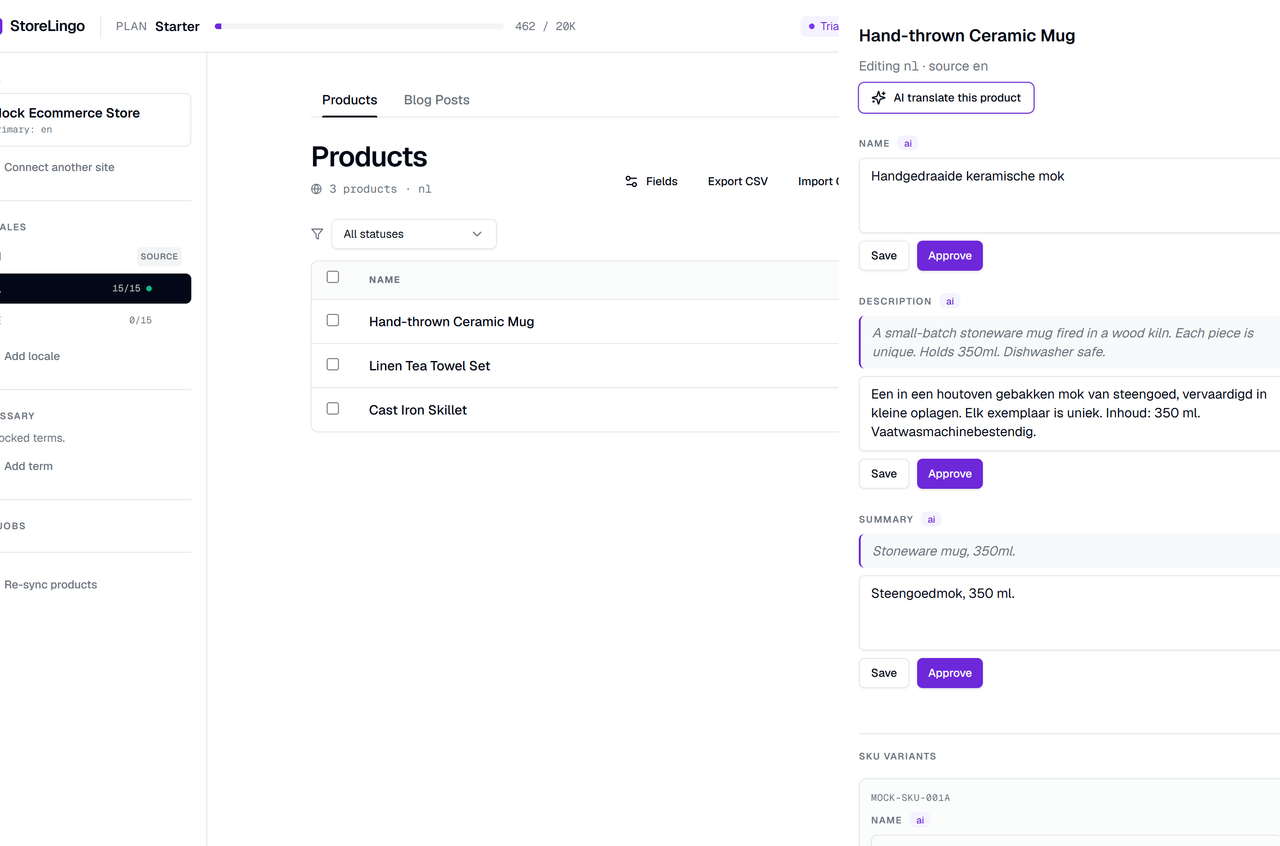
Open a product. Edit a locale. Click Approve.
StoreLingo opens from Webflow in its own browser tab. You review every translation there before it is published into your Webflow site.
- AI translate missing fills the empty fields with DeepL and keeps glossary terms untranslated.
- Edited and approved rows are kept by AI translate missing. The separate, labelled Re-translate action overwrites them and uses AI characters.
- Publish writes the translated copies, with every variant and slugs such as de-blue-mug, straight to your live Webflow site. Your own unpublished Designer changes stay unpublished.
- CSV export and import for work with human translators. Rows that do not match are reported, not guessed.
Screenshots from the StoreLingo app.
StoreLingo opens from Webflow in its own browser tab at storelingo.com/app.
How StoreLingo connects to your site.
What it can access, how your access token is stored, and what stays when you leave. GDPR: see our privacy policy and DPA.
You authorize StoreLingo on Webflow's own consent screen. We never see your Webflow password.
Read the authorized user; read and write sites, CMS and Ecommerce data. Writing to sites is what lets StoreLingo publish. It does not ask for permission to add custom code.
Your Webflow access token is encrypted at rest with AES-256-GCM. Sessions use signed, HTTP-only cookies sent over HTTPS.
Translated copies are your content and stay in Webflow, and so does the Locale field, unless you remove them first with "Remove translations from Webflow". How to remove them is in the docs. StoreLingo deletes its stored data 30 days after it loses access.
What StoreLingo does and does not do
StoreLingo only. How it differs from a tool that translates your pages with its own script or servers is explained on the pages linked below.
Pricing
A flat monthly price per plan, in USD, VAT included where it applies. Each plan includes a monthly allowance of AI characters. Translations reused from your translation memory do not count, and editing by hand is unlimited.
- 1 site
- 2 languages
- First 100 products per site translated and published
- 20,000 AI characters per month
- 3 sites
- 5 languages
- First 1,000 products per site translated and published
- 100,000 AI characters per month
- 10 sites
- Unlimited languages
- Unlimited products per site translated and published
- 500,000 AI characters per month
- Unlimited sites
- Unlimited languages
- Unlimited products per site translated and published
- 2,000,000 AI characters per month
- Founding offer. Enter the code FOUNDING50 at checkout for 50% off any plan for 12 months. It can be used 50 times in total. The 12 months start when you use the code, so trial days left at that moment count toward them.
- Products. All your products are synced. On Starter and Growth the first 100 or 1,000 products (oldest first) can be translated and published; the app shows how many your plan covers.
- Unlimited is always subject to your Webflow plan's own CMS item and product limits. Translated copies count toward them.
- Trial. 14 days from install, on Starter's limits, no card needed to start. Publishing to Webflow asks for a card on file; nothing is charged before your trial ends. Choosing a plan keeps your remaining trial days.
- Plan changes update the same subscription, prorated.
- Without an active plan (the trial ended without a plan, or your subscription ended) you can view, export and delete, but not translate, publish or sync. Everything already in Webflow stays.
Questions
Why does this exist?
According to Webflow's Help Center (Webflow Localize overview and Webflow Ecommerce overview, read on 2026-10-30), Webflow Localize does not localize Ecommerce products, categories or Ecommerce pages on sites that use Ecommerce. StoreLingo translates products and CMS items with DeepL and publishes each language into your own Webflow site: products as separate items, and on a site with Webflow Localization, CMS items into Webflow's own locales.
What does "you own the translations" mean?
Each translated product is a separate item in your Webflow site. On a site with Webflow Localization, CMS translations live in Webflow's own locales as the locale version of the same item; elsewhere CMS translations are separate items too. Either way it is your content and stays in Webflow if you cancel or uninstall StoreLingo. If you edit a translated field in Webflow, StoreLingo replaces it with its own version the next time you publish that language, so make lasting edits in StoreLingo.
How do visitors see their language?
That is your setup in Webflow. On a site with Webflow Localization, CMS translations are in Webflow's own locales, so Webflow serves them on that locale's pages. Translated products are copies: StoreLingo adds a Locale field to each translated copy (for example de or fr). Your own source products and CMS items are not tagged, so for the source language you show the items without a Locale value. You duplicate your listing pages per language and filter each Collection List by the Locale field. StoreLingo does not route visitors and does not add a language switcher. The app shows a routing guide after your first publish. You do not paste any code.
Does StoreLingo add hreflang tags?
No. StoreLingo does not add hreflang tags and places no code on your pages. hreflang tags tell search engines which pages are language versions of each other. Without them, search engines decide by themselves which version of a page to show.
What does AI translation cost?
Each plan includes a monthly allowance of AI characters, from 20,000 on Starter to 2,000,000 on Agency. Translations reused from your translation memory do not count, and editing by hand is unlimited. Translation is done by DeepL.
Can I edit AI translations?
Yes. Open any product, edit the text and click Approve. "AI translate missing" fills only empty fields, so it keeps your edits and approvals. "Re-translate" is a separate, labelled action: it overwrites existing translations, including edited and approved ones, and uses AI characters.
What happens when I change a product or CMS item in Webflow?
StoreLingo receives the change from Webflow, for products and CMS items alike, updates its copy of the source (texts, options and variants) and marks the affected translations Needs review. Re-sync pulls the latest source content on demand. Nothing is translated again or published by itself: your translated copies in Webflow change only when you publish again.
What happens if I disconnect and reconnect a site?
Your translated copies stay in your Webflow site. The Lost translations dialog finds copies that StoreLingo is no longer linked to and can adopt them back, so you keep editing without translating again, or delete them. If two source products have the same name once punctuation is removed, StoreLingo does not guess and lets you decide per row.
What stays in my site if I uninstall?
Your translated products and their variants, your translated CMS items (on a site with Webflow Localization, the locale versions of your CMS items), the Locale field on the Products collection and on each published CMS collection, and the Locale value on source CMS items tagged by older versions of StoreLingo. They are your content. Before you uninstall, "Remove translations from Webflow" in the app deletes the translated copies and the Locale fields StoreLingo created; after an uninstall StoreLingo can no longer reach your site. Our docs also explain how to remove them by hand in Webflow. StoreLingo deletes your account and stored data 30 days after it loses access to your site.
Free trial?
14 days from install, on Starter's limits. No card is needed to start: you can connect a site, translate, edit and manage the glossary. Choosing a plan with a card keeps your remaining trial days. There is one trial per StoreLingo account.
Why does publishing require a card?
Publishing writes translated copies into your live Webflow site, so it asks for a card on file. Nothing is charged before your trial ends, and you can cancel from the billing portal.
Guides from the blog.
Longer guides on translating a Webflow store, written by the team that builds StoreLingo.
How to translate Webflow Ecommerce in 2026 (every option compared)
The ways to translate a Webflow Ecommerce store, side by side.
Weglot alternatives for Webflow stores
What to look at when you consider moving away from Weglot.
Webflow CMS duplicate-row architecture explained
How publishing translated copies works, and its tradeoffs.
Got a Webflow store with products?
Let's translate it.
We reply within one business day (Monday to Friday, CET). Pro and Agency requests are handled first. Tell us about your store and we'll answer your questions before you start the trial.
- 14-day free trial, no card needed to start
- Coming from Weglot? Import a Weglot CSV export. Rows that do not match are reported for you to review.